Section 1: Introduction to Google ADK
This documentation serves as the comprehensive written companion to the Google ADK Masterclass on Udemy. While these guides provide technical reference and code snippets, the video course provides deep-dive reasoning, architectural walkthroughs, and live debugging sessions.
Welcome to the foundation of the Google ADK Masterclass. In this section, we explore why the Python SDK for ADK (version 1.0.0) is the most stable framework for building production-ready, steerable AI agents. We will analyze the transition from stateless LLMs to stateful agentic workflows and how Google's ADK solves the "spaghetti code" problem of modern agent orchestration.
Master Google ADK - Agent Development Kit
Build Multi Agent Systems | Mac, Windows, Ubuntu | Deploy to Google Cloud | Free Gemini Key
What is an Agent Framework?
To understand the Agent Development Kit (ADK), we must first understand the limitations of raw Large Language Models (LLMs).
At its core, an LLM (like Gemini or GPT-4) is incredible but stateless and passive. It waits for a prompt, generates a reply, and forgets immediately. To transform an LLM into a "Helpful Coworker," we need a software layer that provides what the model is missing.
This layer is the Agent Framework. It wraps the LLM with three critical components:
- Memory: The ability to persist state and remember past conversations.
- Goals: A mechanism to maintain a "to-do list" or a mission directive.
- Tools: The ability to execute code, call APIs, query databases, or access search engines via protocols like MCP.
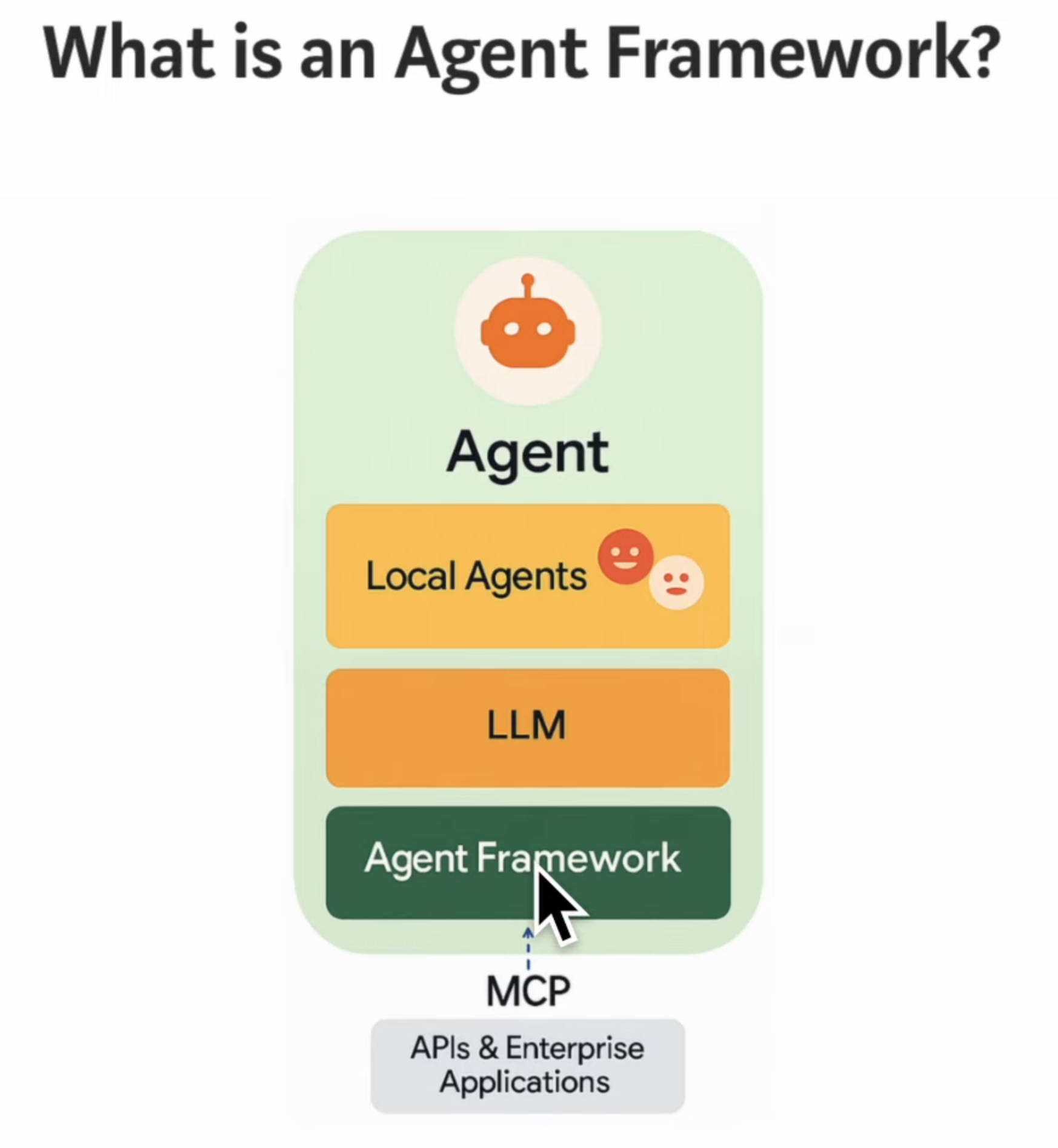 Visual representation of how an Agent Framework wraps Local Agents, LLMs, and MCP Tools.
The Complexity of Multi-Agent Systems
Developing a single agent is straightforward. However, modern enterprise requirements often demand a Multi-Agent System. This involves orchestrating:
- Host Agents: The central orchestrator.
- Local Agents: Specialized sub-agents running on the same machine.
- Remote Agents: Agents accessed via network protocols (A2A).
- MCP Servers: Standardized tool interfaces.
Without a standardized framework, developers often create a complex web of prompts, manual state management, and fragile API integrations. This leads to unpredictable performance and difficult debugging.
Google ADK addresses this by standardizing the communication layer. It handles the "plumbing" between the Client Frontend, the A2A (Agent-to-Agent) Server, and the underlying MCP Connectors.
Why Google ADK?
The Google ADK (specifically the Python SDK v1.0.0) is built on a core design principle: Make Agent Development feel like Software Development.
Instead of relying on "prompt engineering magic," ADK focuses on deterministic code structures, typed interfaces, and reliable state management. It allows you to build agentic architectures ranging from simple tasks to complex, multi-agent workflows.
Standout Features
1. Native Bi-Directional Streaming
ADK provides out-of-the-box support for real-time audio and video interaction.
- See: The agent can process video streams native.
- Hear: The agent can process audio input.
- Respond: The agent generates responses in real-time without requiring third-party streaming libraries.
2. The ADK UI Playground
ADK ships with a powerful local development tool for inspection and tracing. It provides visualization for events, state changes, artifact generation, and session management.
To launch the playground, run the following command in your terminal:
adk web
Once initialized, the dashboard is accessible at:
- URL:
http://localhost:8000 - Features: Token streaming, event visualization, and step-by-step request tracing.
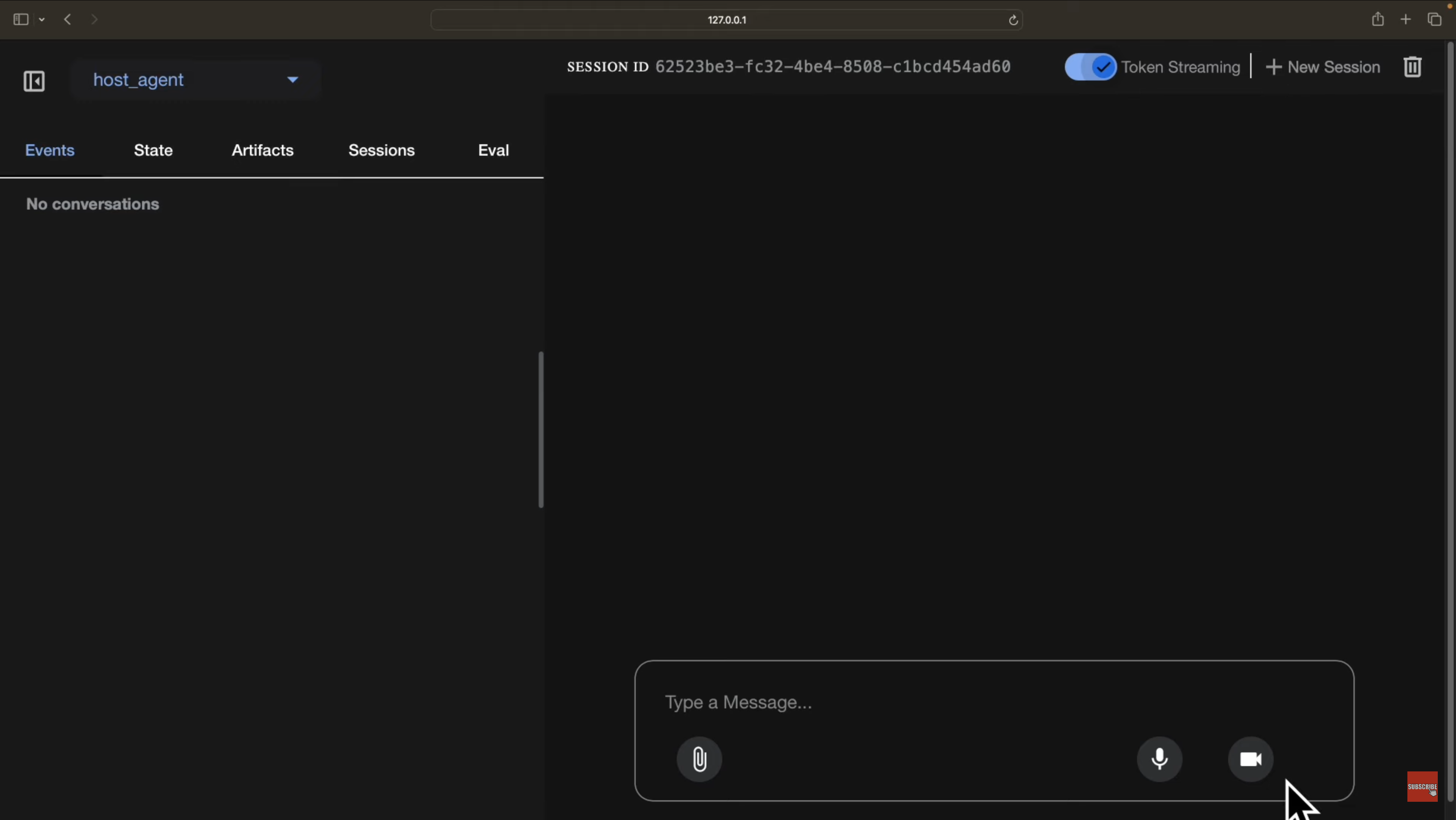 The ADK Web Interface showing session management and event logs.
Interoperability & Ecosystem
While optimized for Google Gemini and the Google Cloud ecosystem, ADK is designed to be flexible:
- Model Agnostic: Can be configured to work with models from other providers or open-source self-hosted models.
- Deployment Agnostic: Run agents locally on a laptop, deploy to Google Cloud, or host on on-premise infrastructure.
- Interoperable: Connects seamlessly with existing APIs and Model Context Protocol (MCP) servers, allowing integration with tools regardless of the framework they were built on.
Although the Python SDK is officially v1.0.0, the ecosystem is evolving rapidly. This course treats ADK as "Live Software"—we will address updates and changes as they happen. Be prepared for a fast-paced development cycle.
Project Overview
Throughout this course series, we will move beyond theory to build a practical application. We will develop an Autonomous Software Engineer Agent capable of writing, debugging, and rendering HTML pages from scratch, utilizing the full power of the ADK toolset.
What's Next?
In the next section, we will set up our Local Development Environment, configure our API keys, and run the basic "Hello World" of the agentic world.
Proceed to Section 2: Environment & Setup →
Master Google ADK - Agent Development Kit
Build Multi Agent Systems | Mac, Windows, Ubuntu | Deploy to Google Cloud | Free Gemini Key